Enable Age Verification in HT-Retail
Description: In the HT-Retail system, you have the ability to either swipe a driver’s license through the MSR. Or, use a Honeywell Voyager 1400G 2D Barcode Scanner to scan a driver’s license barcode to verify the validity of the card. Review the steps to enable the Age Verification functionality below.
Enabling Age Verification will require you to build a query within the system. Additional information on building a query can be found in the Query Builder Overview article.
Age Verification Overview
To enable Age Verification within the HT-Retail system:
- Log in to the POS system and select Setup either from the Home screen or at the top navigation bar.
- Open the General Settings tab, then the General sub-tab.
- Press the Age/ID Verification button in the lower right corner of the screen to open the Minimum Age Rule Editor window.

- Press Create New Rule, and a new blank rule will appear in the lower portion of the screen.
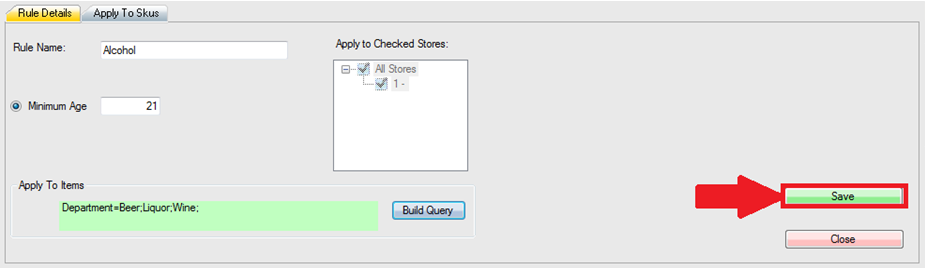
- Enter a Rule Name and the Minimum Age you wish to apply to the rule.
- From there, select which Stores are included in your rule (applicable only to Multisite), and press Build Query to determine which items the rule will be applied to.

- On the Query Builder screen, select Department, the equals “=” sign, and then Load from List.
- Check off all departments that you would like the rule to apply to and press Add >> then Done to place it under Current Query.

- Back on the Minimum Age Rule Editor, press Save to commit the Age Verification rule.
Using Age Verification
- To use Age Verification within the system, process a transaction as you normally would.
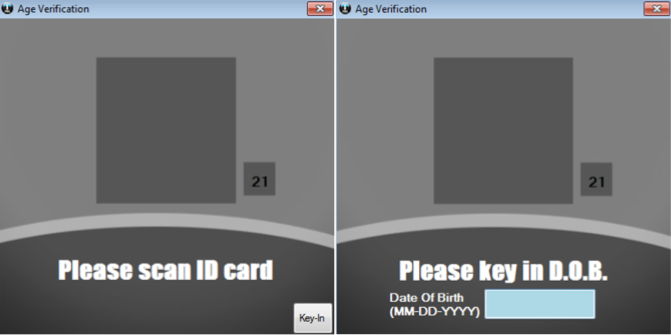
- Once you select Payment, a window will appear asking for an ID to scan.
- You may swipe the driver’s license through the MSR, scan the 2D barcode on the back with our 2D Barcode Scanner, or press Key-In located in the bottom right corner to manually enter the date on the license.
- The ID must match the Minimum Age set in your rule (displayed in the small box to the right of the popup) or the purchase will not go through.
Important:Select states have eliminated the magnetic stripe on the back of their driver’s licenses. THESE MUST BE SCANNED WITH A HARBORTOUCH PROGRAMMED 2D BARCODE SCANNER!