
Shift4 Gift Cards Program FAQs
Who can join the Shift4 Gift Cards program?
Any E2E Shift4 merchant can enroll. For the Workstation for Shift4 Dine, the enrollment will be available in their Shift4 Dine Customer Hub Portal.
If a merchant is not using the Workstation for Shift4 Dine, please submit an enrollment request to the Gift Card Support team to review and assist.
Do the consumers pay any fees?
No.
Where are the Shift4 Gift Cards settings managed?
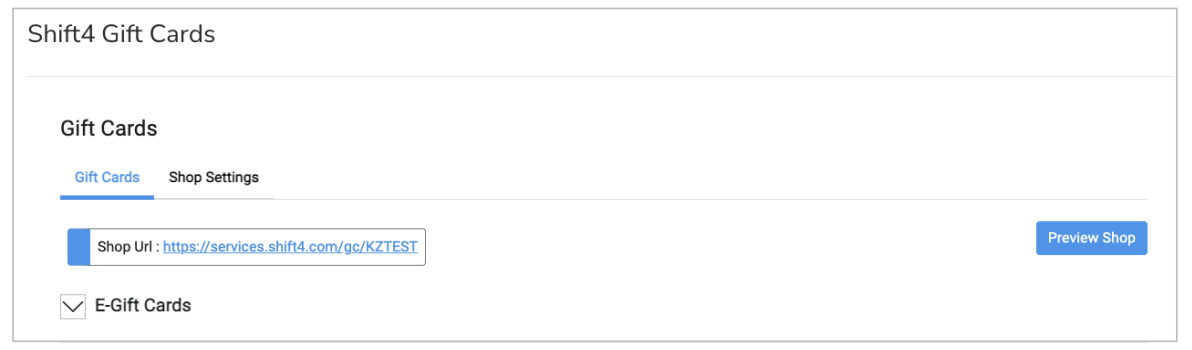
Through the Shift4 Gift Cards section in Shift4 Dine Customer Hub. There are two tabs: one for Gift Cards and one for Shop Settings.
Orders can be managed through the Gift Card Order Management screen (Gift Cards > Shift4 Gift Cards Orders from the Navigation bar).
Can customers use Shift4 Gift Cards at other locations?
Yes. The gift card department can link the merchant’s locations for gift card purposes, so their gift cards may be used interchangeably across their locations.
Can the shop URL be changed?
Yes. The shop URL (found on the top of the tabs) can be changed using the ‘Update Shop Details’ button at the top right of the Shift4 Gift Cards page.
Note: You can also update the email and phone number that display on the eCards here.

Can customers buy physical Shift4 Gift Cards online?
Yes. Your location can offer sales of physical Shift4 Gift Cards.
How are physical gift cards mailed to customers?
If the location wants to offer physical gift cards for online purchases, the location will need to arrange for the gift card to be loaded and shipped. Shipping information can be found by selecting the row on the Gift Card Order Management screen (Gift Card Orders from the nav bar).
Note: Details for the order will be emailed to the email account that signed up for Shift4 Gift Cards.
The location should load the gift card through the Workstation to fulfill these orders. Since payment was already taken through the online shop, we suggest using a custom tender type for payment to close the ticket for the gift card to be activated.
Are online purchases refundable?
Yes. From the Gift Card Order Management screen (Gift Card Orders from the nav bar), you can cancel the order on the row.
Note: This will automatically void the gift card if the order is for eGift.
Do Shift4 Gift Cards expire?
Australia: By default, Shift4 Gift Cards expire 3 years after the date of purchase/activation.
All other countries: By default, Shift4 Gift Cards do not expire.
To change the expiry setting for your program, contact the Gift Card team at giftcardteam@shift4.com.
Note: Merchants are responsible for ensuring their gift card program, including any expiry dates and how they are communicated to customers, complies with the laws in the jurisdictions where they operate. Gift card laws vary by country and, in the US and Canada, by state or province.
For an overview of US state laws, see the National Conference of State Legislatures (NCSL) gift card statutes. This information is not legal advice. Merchants should consult their own legal advisor.
On which devices can gift cards be redeemed?
Gift Cards can be redeemed on any device or terminal that is certified to process Shift4 gift cards through our payment processing gateway, including the Workstation for Shift4 Dine.
Can a customer tip using a gift card in the Workstation?
Yes, but for physical gift cards only. This can be configured by navigating to Manager > Settings > Payments > Tenders, and then selecting Gift Card tender type and enabling the Allow Tips toggle.
How can locations see all the outstanding gift cards?
The reporting location depends on which Shift4 Gift Card program you are using:
- New Shift4 Gift Cards program: See the Liability section in Access and Run Reports in the Shift4 Gift Card Portal.
- Legacy gift card program: In Shift4 Dine Customer Hub, navigate to Reporting > Shift4Gift Reporting, and view the Gift Card Balances Report.

Where can locations see the transaction data?
The reporting location depends on which Shift4 Gift Card program you are using:
- New Shift4 Gift Cards program: See View and Customize the List of Transactions Report in the Shift4 Gift Card Portal.
- Legacy gift card program: In Shift4 Dine Customer Hub, navigate to Reporting > Shift4Gift Reporting, and view the Gift Card Balances Report.

Can eGift Cards be distributed at no cost, as a complimentary offering, in the Workstation for Shift4 Dine?
At present, there is no functionality to issue eGift Cards on a complimentary basis using Shift4 Dine POS software. The only gift cards that can be compensated for are the physical ones. For more information, review the Complimentary Gift Cards article. The workaround for purchasing an eGift Card as a complimentary gift is that the business owner would purchase an eGift card directly through their shop. In such cases, the purchase amount remains within the business revenue.