Import - Shift4

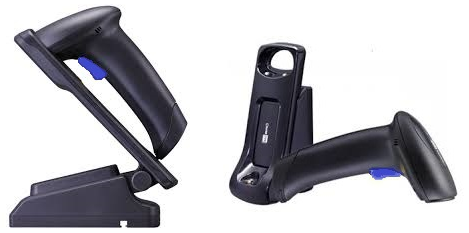
CipherLab 1504p 2D Barcode Scanner Specifications

image-0.png


General Information

Model Number: 1504p

Advantages of the 2D Barcode Scanner

The CipherLab scanner comes with the base package for Salon & Spa/Checkout systems as it offers superior scanning, even on items with condensation, shiny cans, clear bottles, or items wrapped in cellophane. Merchants on the Retail platform that require Age Verification will still need to purchase the Honeywell as the CipherLab scanner cannot parse license data for the software.

CipherLabs Scanner Setup & Deployment

The scanner connects to the POS via USB cable, no drivers required on the Android platform. Test the scanner by scanning a barcode into a text document or open field to ensure it is scanning properly. When the trigger is pressed, a red cross-hair outlined by a white LED will appear.

Before leaving Deployment, the 1504p needs to have a series of configuration barcodes scanned, as well as if a factory reset is required on site.

Character Delay

The first series of barcodes allows you to enable a Character Delay.
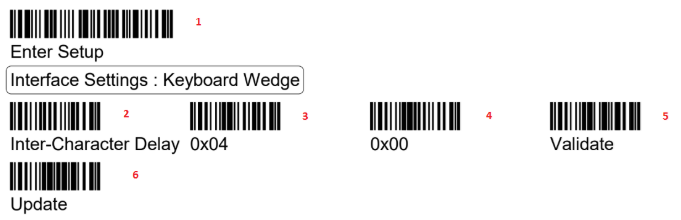
image-1.png

Read Full Barcode Digits

The second is to enable the full barcode digits to be read.

image-2.png

Always On (Presentation Mode)

If you request the scanner be “always on” (aka: Presentation Mode) scan the following codes:

image-3.png

Beeper Volume

Use the below barcodes to adjust the volume of the beeper on the barcode scanner (options are Mute, Minimum Volume, Medium Volume, or Maximum Volume.

image-4.png

Reading Driver Licenses

The CipherLab 1504 is capable of reading 2D driver’s licenses. For compliant 2D licensed card
scanning, it decodes the information embedded in the ID cards to formatted data. 

mceclip0.png

mceclip1.png

Output Sequence Setup

You can arrange the sequences of license embedded data via separators and fields. In order to present data in a consistent format, some barcodes (ex. First Name, Middle Name/Initial, Last Name, Name suffix, Name Prefix, Birth Date, and so on) will return data based on the calculated actual data contained in the ID barcode.

mceclip2.png

mceclip3.png

For more formatting options, please reference the full User Guide attached below.

Attachment:

Cipherlab 1504p User Guide.pdf

  • Was this article helpful?