
Help Screen Overview in Shift4 One
Description: Learn how to access and use the Help screen in Shift4 One to submit product feedback, view system information, report bugs, and contact Shift4 Support.
Availability: United States, Australia
Overview
The Help screen in Shift4 One provides you with quick access to support-related tools. From this screen, you can share feedback to improve the product, review detailed system information, or report application issues.
Accessing the Help Screen
- From the Home screen, tap the hamburger menu (3 horizontal lines).

- Tap Help.
The Help screen contains the following menu options:
- Product Improvement
- System Information
- Report a Bug
- Shift4 Support

Product Improvement
The Product Improvement option allows you to submit feedback and suggestions to help improve Shift4 One.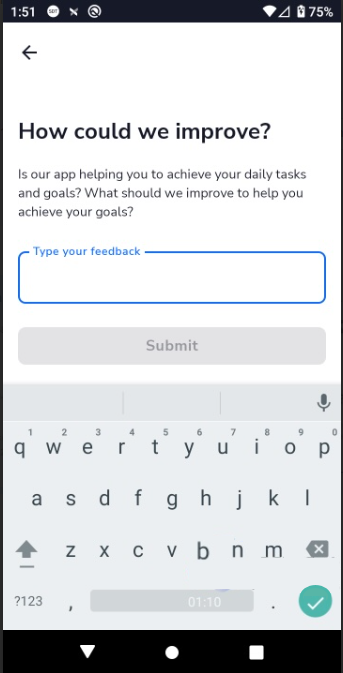.png?revision=1)
Screen details:
- Displays the prompt “How could we improve?”
- Includes a text field for entering feedback
- An on-screen keyboard is available for typing
- Tap Submit to send the feedback
System Information
The System Information option displays important device and application details. This information is read-only and useful for troubleshooting and support.

Report a Bug
The Report a Bug option allows you to report issues encountered while using Shift4 One..png?revision=1)
Screen details:
- Displays the prompt “What was the issue?”
- Includes a text field to describe the issue
- An on-screen keyboard is available for typing
- Tap Submit to send the bug report
Shift4 Support
The Shift4 Support option provides a direct way to contact the Shift4 Support team without leaving the app.
When you open this option, a QR code is displayed. Scan the QR code to connect to a WhatsApp chat with Shift4 Support. The chat will open with the following message pre-filled for you:
Hello! I need some assistance please.
Merchant ID (MID): [your MID]
Serial Number: [your serial number]
Replace the placeholder values with your Merchant ID and Serial Number, then tap the Send button to connect with the support team.